How to Set a Reminder Without a Date on iPhone
Fix the garden fence. Learn to make sourdough. Call that friend you keep meaning to call. None of these happen on a particular Tuesday, and pretending they do is how they end up ignored.
Undated reminders are allowed, they just disappear
Most reminder apps on iPhone, including the built-in one, let you save a task without a due date. The problem is not saving it. The problem is that a reminder with no date never comes back to you on its own. It has no alert, it does not show in today's list, and it slowly sinks under everything that does have a date.
So people do the next obvious thing and give it a fake date, "this Saturday", just to make it appear somewhere. Saturday comes, the fence does not get fixed, the reminder goes overdue, and now it is a small red guilt badge instead of a plan.
Give undated things a home, not a deadline
The honest version of "I'll do it sometime" is a separate place for things that have no date yet, that you actually look at. In Remi that place is Someday:
- Tap the + button and type the reminder.
- Switch on Don't have a concrete date in mind?
- Save. It goes into the Someday section of your reminders list, below everything that is coming up.
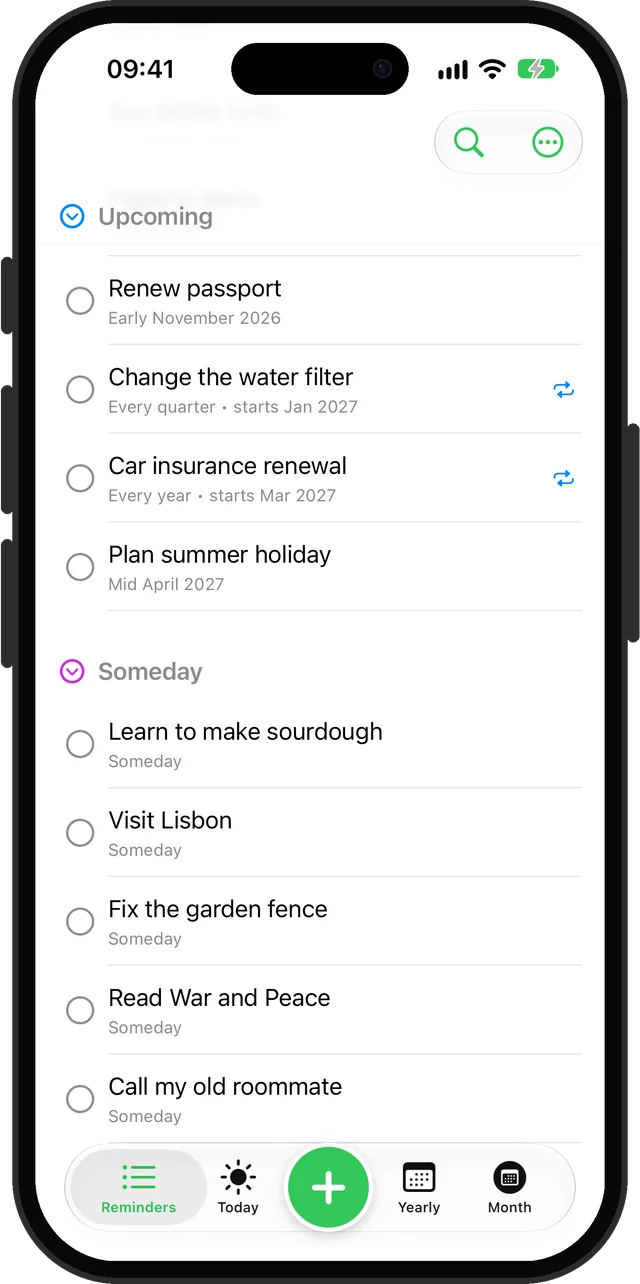
When "someday" gets closer, give it a rough time
Most undated tasks eventually firm up a little. Not to a day, but to a stretch of time: "before winter", "early next month", "sometime in spring". Remi has a middle step for exactly that. Open the reminder and pick Early, Mid or Late of a month, or Anytime that month. It moves out of Someday and into your upcoming list, without inventing a deadline you will just miss. More on that in reminders for sometime next month.
Do undated reminders send notifications?
No, and they should not. A notification needs a moment to fire, and the whole point is that there is no moment yet. In Remi you see them whenever you open the list, and you can turn on a weekly or monthly summary notification in Settings that gives you a nudge about what is coming up.
Questions
Can you make a reminder without a date on iPhone?
Yes. Both the built-in Reminders app and Remi let you save a reminder with no date. In Remi, switch on "Don't have a concrete date in mind?" and it goes into the Someday section of your list.
Will a reminder with no date ever notify me?
Not on its own, because there is no time for it to fire. In Remi it stays visible in your Someday list, and an optional weekly or monthly summary notification reminds you to look.
Updated 2026-10-01. Written by Emils Ozols, who makes Remi.