Why Is My iPhone Reminder Not Working?
You set the reminder. The time came and went. No banner, no sound, nothing. Almost every time, the reminder was fine and one setting between it and you was not.
 Remi is an iPhone appPoint your iPhone camera at the code to install it.
or text me the link
Remi is an iPhone appPoint your iPhone camera at the code to install it.
or text me the link
First, work out which kind of "not working" you have
"Reminders not working" covers several different problems with different causes. Match yours before you start changing settings:
| What happened | Most likely cause | Jump to |
|---|---|---|
| No banner and no sound at all | Notifications off for Reminders, or a Focus | Steps 1 and 3 |
| A banner appeared, but silently | Silent mode, or sounds off for the app | Step 2 |
| It came, but at the wrong time | Date with no time (9:00 AM default), or time zone | Step 4 |
| An Urgent reminder did not ring | Alarms permission, or the wrong device | Step 5 |
| A location reminder never fired | Location Services off | Step 6 |
| It went to your Apple Watch, or nowhere | Watch notification routing | Step 7 |
| Reminders missing or out of date on one device, often after an update | iCloud sync | Step 8 |
The steps below follow iOS 26 and iOS 27. At the time of writing the current version is iOS 27.2, released on 26 October 2026, and the newest iOS 26 update is 26.7.2. Apple's support pages give the same Settings paths for both.
Step 1: Make sure Reminders is allowed to notify you
A reminder is delivered as a notification. If the app is not allowed to send notifications, the reminder still exists, it just never tells you. This switch is easy to turn off by accident, for example by swiping left on one reminder notification, tapping Options and choosing Turn Off, which stops notifications for the whole app.
- Open Settings and tap Notifications.
- Under Notification Style, tap Reminders.
- Turn on Allow Notifications.
- Under Alerts, make sure at least one place is chosen to show them, and check that Sounds is on if you want to hear them.
Do the same for any other reminder app you use. Each app has its own entry in that list, and each one can be switched off on its own.
Step 2: Silent mode and volume
Apple's own wording is plain: if your iPhone is silenced or the volume is turned all the way down, notification sounds will not play. The banner still appears on the screen, but if the phone is in a pocket or face down, a silent banner is easy to miss completely.
That is the normal, intended behaviour of a reminder. A reminder is a notification, not an alarm. If something has to make a noise even on Silent, read reminder or alarm, and see Step 5 below for Urgent reminders.
Step 3: A Focus is holding it back
Do Not Disturb, Sleep, Work and every other Focus filter notifications. Reminders that arrive while one is on wait quietly in Notification Center instead of alerting you. If reminders work at some times of day and not others, a Focus is the first suspect.
- Open Control Center and look at the Focus button. If a Focus such as Do Not Disturb or Work is named there, tap it to turn it off.
- To let reminders through while a Focus is on, go to Settings > Focus, choose the Focus, tap Apps, make sure Allow Notifications From is selected, and add Reminders.
- Repeat for each Focus you use. They are set up separately.
Two catches. A Focus can be shared across your devices, so a Focus you started on your Apple Watch or iPad can silence your iPhone too. And the Driving Focus does not let you allow individual apps at all.
One more filter to check: the notification summary. Since iOS 15, the iPhone can collect notifications it does not treat as time critical and deliver them in a batch later. If you have set one up and added Reminders to it, a reminder can turn up hours after its time. Check how Reminders is delivered under Settings > Notifications.
Step 4: It fired at the wrong time
The reminder has a date but no time
If you give a reminder a due date but no time, the built-in Reminders app treats it as all day and sends the notification at 9:00 AM by default. So "remind me on Friday" made at 4 PM on Thursday arrives at 9 the next morning, not 24 hours later. You can change that default time:
- Open Settings > Apps > Reminders.
- Tap the time under All-Day Reminders and pick a new one.
If you want a specific time, add the time to the reminder itself rather than relying on the all-day default.
Travel and time zones
On iOS 26 and later, Reminders has its own Time Zone setting under Settings > Apps > Reminders. If reminders started firing at odd hours after a trip, look there. Apple also lists wrong date and time settings as a cause of sync trouble, so make sure the iPhone's own date, time and time zone are correct for where you are.
Step 5: An Urgent reminder did not ring (iOS 26.2 and later)
Since iOS 26.2 you can mark a reminder as Urgent: tap the reminder, tap the Info button, and turn on Urgent under Date & Time. Reminders then schedules an alarm that rings even on Silent or with a Focus on. If you turn it on without a date and time, they default to the next hour.
If an Urgent reminder stayed quiet, there are three things to check:
- The alarm permission. Go to Settings > Apps > Reminders and turn on Alarms under Allow Reminders to Access.
- The device. Urgent alarms only ring on the device that Find My uses as your location. Open Find My, tap Me and see which device is shown. If it is your iPad and you were holding your iPhone, the iPhone stays silent.
- iCloud Reminders. You can only mark a reminder as Urgent once iCloud Reminders is set up. If the Urgent switch is missing, turn on Reminders in iCloud first (see Step 8).
On versions before iOS 26.2 there is no Urgent option, and every reminder is a regular notification.
Step 6: A location reminder never fired
"Remind me when I get home" depends on knowing where you are. Apple says location based reminders need Location Services turned on: go to Settings > Privacy & Security > Location Services and turn it on. If you use Siri to create them, add your home and work addresses to your own card in Contacts, so "home" and "work" mean something.
Step 7: Your Apple Watch got it, or nothing did
With an Apple Watch paired, a notification normally goes to one device, not both. If your iPhone is unlocked, it shows on the iPhone. If the iPhone is locked or asleep, it goes to the Watch, unless the Watch is locked, in which case it goes back to the iPhone. So a reminder you "never got" may have tapped your wrist while the phone sat on the desk.
If reminders do not show on the Watch at all:
- Open the Watch app on your iPhone and tap My Watch.
- Tap Notifications, then tap Reminders.
- Choose Mirror my iPhone to use the same settings as the iPhone, or Custom to set them separately.
Also check whether the Watch itself is in a Focus or in Low Power Mode. In Low Power Mode the always on display is off, and Apple notes you might not see a notification unless you raise your wrist.
Step 8: Reminders missing or not syncing, often after an update
If a reminder you made on your Mac or iPad never fired on your iPhone, the iPhone may simply not have it yet. Apple's checklist for iCloud Reminders that will not sync:
- Update every device to the latest iOS, iPadOS or macOS.
- Sign in with the same Apple Account on every device, and make sure Reminders is turned on: go to Settings > your name > iCloud, tap See All (or Show All), then turn on Reminders.
- Make sure your default list is an iCloud list: Settings > Apps > Reminders > Default List, then pick a list under iCloud.
- Close the Reminders app, wait about a minute, and open it again.
- In the Today view, complete or delete any overdue reminders. Apple suggests doing this on every device that uses iCloud Reminders.
- Restart the iPhone.
Apple's system status page shows whether iCloud itself is having trouble. If it is, waiting is the only fix.
When a missed notification should not mean a missed task
Every fix above is about getting the notification through. But notifications are fragile by design: one Focus, one silent banner, one swipe, and it is gone. The more robust setup is a reminder that stays in front of you after its moment has passed, so a missed alert does not mean a missed task.
That is how Remi handles it. On its day, a reminder sits in the Today tab whether or not its notification got through. If the day ends and it is still not done, it moves to the top of Today, in red (plain, if you have turned on No Stress Mode), above the new day's reminders, and stays there, oldest first, until you tick it off. The Today's Reminders widget, which is free, does the same on your Home Screen, so the overdue item is in front of you every time you look at it, notification or not. More on that in reminders on your Home Screen.
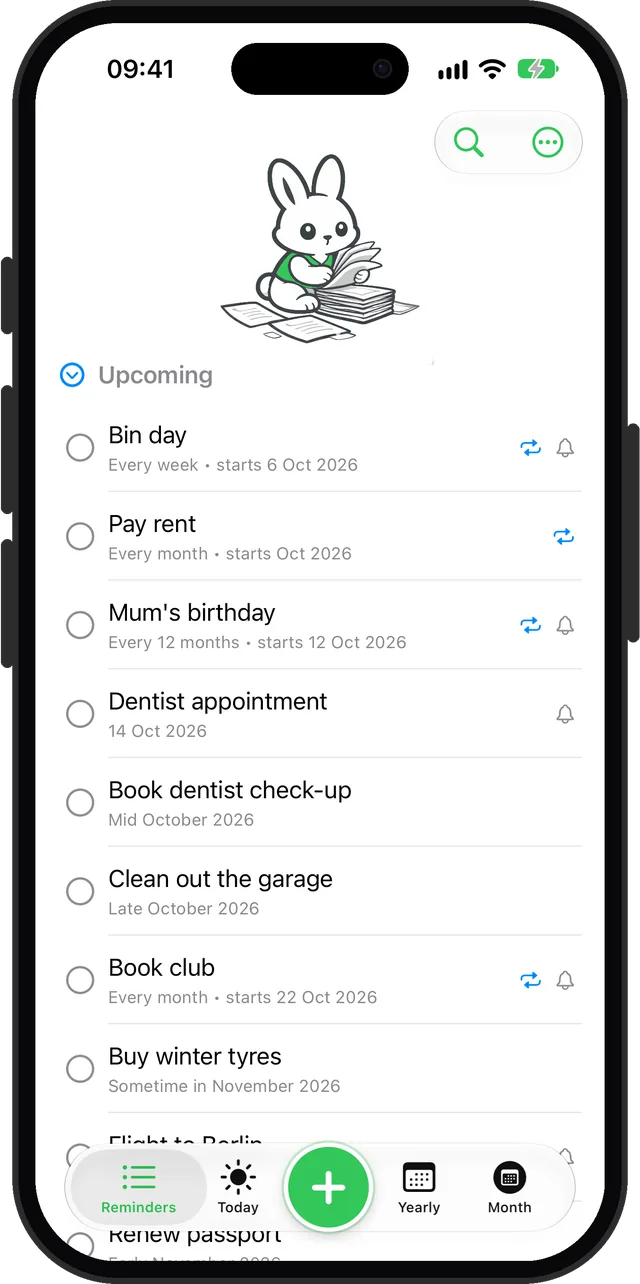
A few honest details about Remi, so you know what you are getting:
- Remi's reminders are regular notifications, so everything in Steps 1 to 3 applies to them too. If iOS has notifications turned off for Remi, its Settings screen says so and opens iOS Settings when you tap the warning.
- Only reminders with an exact date send their own notification. Remi reminders have no time of their own: every notification arrives at the one time of day you pick in Remi's Settings, the same for all reminders, so if one came earlier or later than you expected, check that time there. Reminders for a part of a month, like "mid March", do not: they show in the list, in Today and in the calendars when their time comes. Undated Someday reminders stay in the list until you give them a date. Neither kind sends a notification, so the list is where you find them.
- Remi has no alarm mode. For a medication time or a wake up, use an alarm, or an Urgent reminder in the built-in Reminders app on iOS 26.2 and later.
Still not working?
If every setting above is right and reminders still do not arrive, restart the iPhone, then create a test reminder two minutes ahead with a specific time, no Focus on and the phone unlocked in front of you. If the test arrives, your settings are fine and the problem is in the original reminder: its time, its list, or the device it was made on. If even the test fails, update to the latest iOS and contact Apple Support, because at that point the problem is not a setting you can change.
If your real problem is that you see the notification and then forget the task anyway, that is a different issue, and it is covered in ADHD-friendly reminders.
Sources
- Apple Support: Use Reminders on your iPhone or iPad (9:00 AM default, Urgent reminders, alarms permission, Find My device, location reminders, time zone)
- Apple Support: How to get notifications on your iPhone and Apple Watch (Allow Notifications, Focus, Share Across Devices, Driving, Watch routing)
- Apple Support: Use notifications on your iPhone or iPad (Silent and volume, per-app sounds, swipe to turn off)
- Apple Support: If your iCloud Contacts, Calendars or Reminders won't sync
- Apple Support: iCloud User Guide, set up iCloud Reminders on iPhone (Settings > your name > iCloud > See All)
- Apple Support: Notifications on your Apple Watch (routing, Mirror my iPhone, Low Power Mode)
- Apple Newsroom: iOS 15 notification summary and Focus
- Apple Support: Apple security releases (current iOS 27.2 and iOS 26.7.2, 26 October 2026)
Questions
Why is my iPhone reminder not working?
Usually because notifications for the Reminders app are off, the iPhone is on Silent, or a Focus such as Do Not Disturb or Sleep is holding notifications back. Check Settings > Notifications > Reminders first, then the Focus button in Control Center. A reminder with a date but no time fires at 9:00 AM by default, which can look like a missed reminder.
Why are my iPhone reminders not working after an update?
Check that Allow Notifications is still on for Reminders and that a Focus has not been switched on. If reminders are missing on one device, update every device to the latest version, make sure Reminders is on in iCloud on each one, set an iCloud list as the default, and restart the iPhone.
Why is my Reminders app not sending notifications?
Open Settings > Notifications, tap Reminders and turn on Allow Notifications. Then check that no Focus is filtering it, and that Reminders is not delivered in a notification summary, which batches notifications and delivers them later.
Why did my urgent reminder not ring?
Urgent reminders need iOS 26.2 or later, iCloud Reminders, and the Alarms permission in Settings > Apps > Reminders. They also only ring on the device that Find My uses as your location, so check Find My > Me to see which device that is.
Why are reminders not working on my Apple Watch?
With the iPhone unlocked, notifications go to the iPhone instead of the Watch. If they never show on the Watch, open the Watch app on your iPhone, tap Notifications, then Reminders, and choose Mirror my iPhone. Also check that the Watch is not locked or in a Focus.
Do iPhone reminders make a sound on Silent?
Regular reminders do not: they are notifications, and notification sounds do not play when the iPhone is silenced. Only reminders marked Urgent on iOS 26.2 and later ring as an alarm on Silent.
Missed the alert? It is still on your list
Get Remi on the App StoreUpdated 2026-11-01. Written by Emils Ozols, who makes Remi.