Yearly overview: every reminder across the whole year
Remi's Yearly tab lays out each month of the year on one scrolling page and marks the days that hold a reminder. It is a planner view inside a reminder app, free on iPhone.
 Remi is an iPhone appPoint your iPhone camera at the code to install it.
or text me the link
Remi is an iPhone appPoint your iPhone camera at the code to install it.
or text me the link
What the Yearly view does
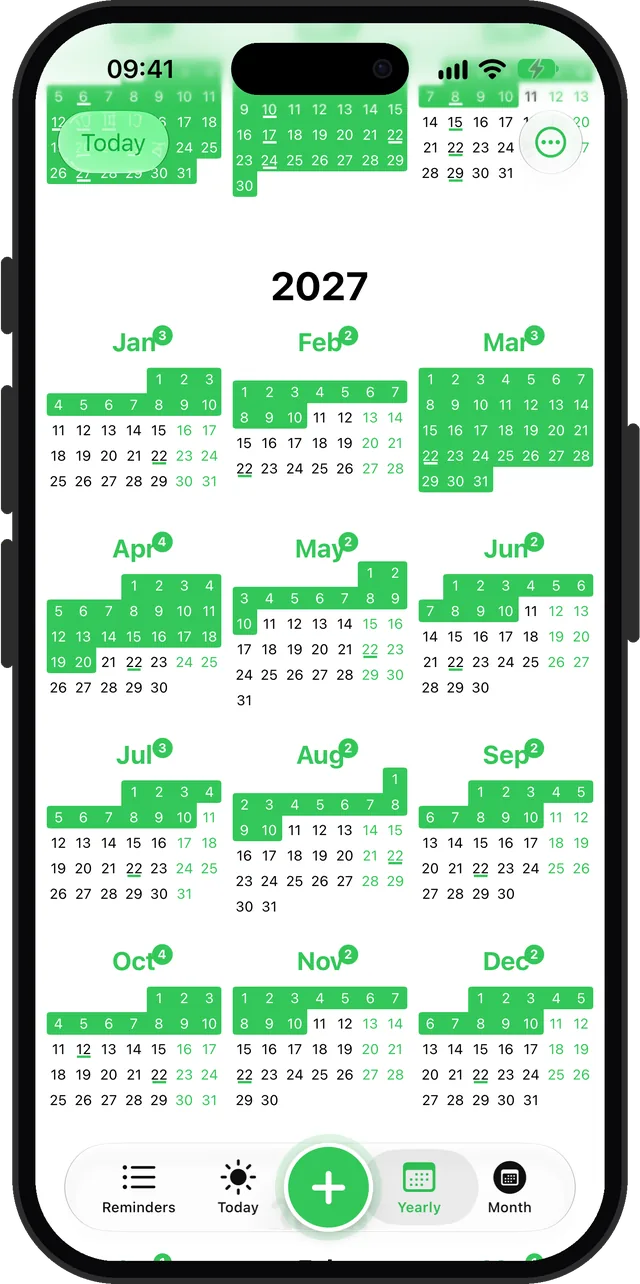
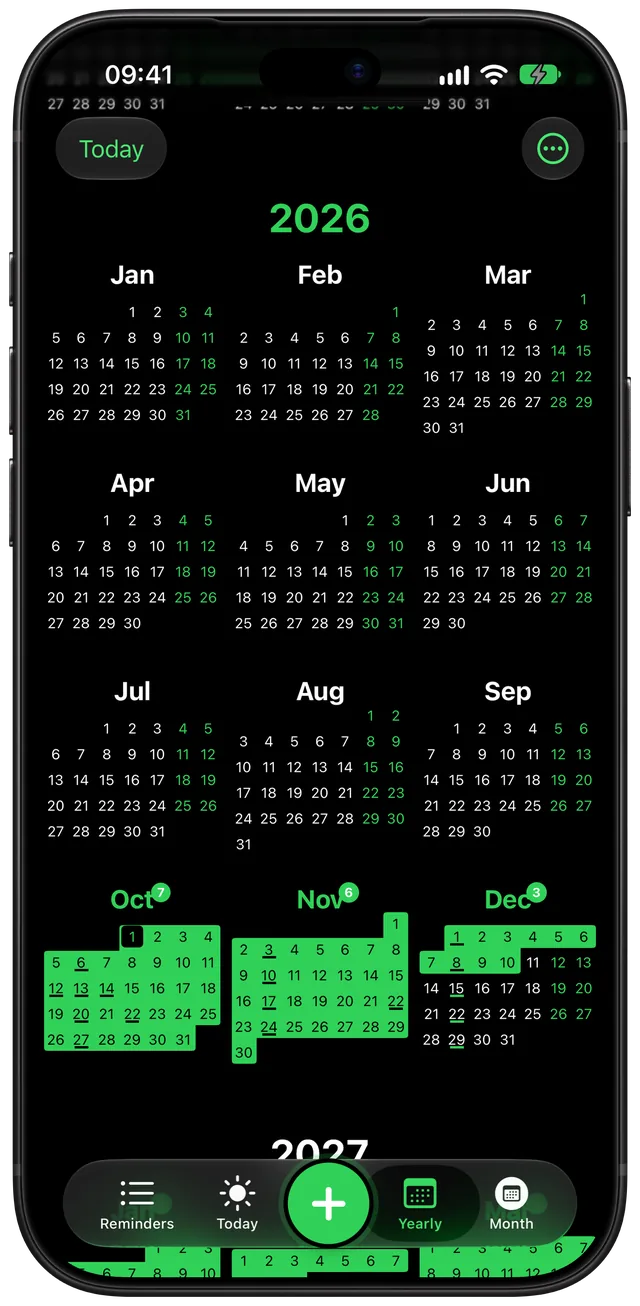
The Yearly tab in Remi shows every month of the year as a small calendar, stacked in one scrolling list. Months and days that hold a reminder are highlighted, so you can see which stretches are full and which are empty without opening anything. Tap a month to open it in the Month tab.
Apple's Reminders app is organised as lists, and its date options are Today, Tomorrow, This Weekend, Next Week or Custom. From iOS 18, scheduled reminders also show in the Calendar app. Remi puts a whole-year picture inside the reminder app itself, and it draws an approximate reminder such as "Early November" as a block of days, not as one made-up date.
How it works in the app
- Open Remi and tap Yearly in the tab bar. It opens on the current year.
- Scroll down for later years, or up for earlier ones. Each year has its own large heading, and the current year's heading is in your accent colour.
- Read the marks in each month. A filled block of days is an approximate reminder (Anytime, Early, Mid or Late). A thin underline under a day number is an exact date or part of an exact range. Today has a box around it.
- Look at the small circled number next to a month name. It counts the open reminders in that month. Months with reminders also get their name in your accent colour.
- Tap any month to jump to it in the Month tab, where the individual reminders are listed.
- Tap Today at the top left to scroll back to the current year.
New reminders show up without any refresh. Remi rebuilds the view whenever you add, edit, complete or delete a reminder. To learn how to create the reminders themselves, see Flexible scheduling.
Options
| Setting | Where | What it does |
|---|---|---|
| Show Reminder Count | ... menu, top right | Shows or hides the count badge beside each month name. On by default. |
| Start week on Monday | Settings, General | Switches the first day of the week in the calendar grids between Monday and Sunday. |
| Repeating reminders show | Settings, General (Premium) | Next occurrence, Next 10 occurrences or Next 100 occurrences. The default is 10. A reminder with an end count stops at that count. |
| Today | Top left | Scrolls back to the current year. |
Open Settings from the ... menu at the top right. The free version shows the current year and everything up to five years from today. Premium, a one-time purchase, lifts that limit. At the bottom of the list, free users see a prompt that reads "Want to plan further ahead?".
When to use it
Spotting a crowded month
Before you agree to a trip in June, scroll to June. A month that is mostly highlighted tells you at a glance that it is already busy.
Placing the yearly chores
Car insurance in March, a boiler service in autumn, a passport renewal. Add each one as an approximate reminder, then check that they do not all land in the same month. Setup is covered in the yearly reminder guide.
Planning around long weekends
Weekend days are tinted in your accent colour, so long weekends and school breaks are easy to spot. File anything you need to book early in the right month and watch its badge grow.
Seeing what is coming in a quarter
If you think in quarters, the grid shows three months per row, so each row is one quarter. The quarterly reminder guide covers repeating tasks on that rhythm.
Checking where a repeating reminder lands
With Premium, set Repeating reminders show to Next 100 occurrences. A monthly or yearly reminder then appears across the grid, so you can confirm it repeats the way you meant. For the bigger picture, see how to plan your year on iPhone.
Limits
- Someday reminders are not on it. A reminder with no date has nowhere to sit, so the Yearly view skips it. Find those in the Reminders list. See the someday list guide.
- Completed reminders do not count. Once you tick one off, it leaves the highlights and the badge.
- It is an overview, not an editor. Tapping a month, or any day in it, opens that month in the Month tab. There is no single-day view in the year grid.
- The badge counts reminders, not days. A range across a week counts once.
- The free version stops five years out. Premium removes that limit.
- It draws only Remi's reminders. Events from other calendars do not appear in it.
Sources
Questions
Is there a year at a glance planner for iPhone?
Yes. Remi's Yearly tab shows all twelve months as small calendars, with reminder days highlighted and a count on each month. It is part of the free app.
Does iPhone have a planner or a yearly overview of reminders?
Apple's Reminders app is organised as lists with due dates such as Today, Tomorrow or Custom. From iOS 18, scheduled reminders also appear in the Calendar app. Remi adds a dedicated year view of its own reminders.
How far ahead can I see in the Yearly view?
Free users can scroll to five years from today. Premium, a one-time purchase, removes that limit. Past the limit, a prompt appears at the bottom of the list.
Do repeating reminders show in the yearly overview?
Yes. With Premium you choose in Settings to show the next occurrence, the next 10 or the next 100. The default is 10, and a reminder with an end count stops at that count.
Can I tap a day in the year view to see its reminders?
No. Tapping a day, or anywhere on its month, opens that month in the Month tab, where each reminder is listed.
Do Someday reminders appear in the Yearly view?
No. A Someday reminder has no date, so it stays out of the calendar. It lives in the Reminders list until you give it a date.
See your year at a glance
Get Remi on the App StoreMore features
Sync your reminders to the iPhone Calendar app
Copy your reminders into an iPhone calendar as all-day events, one way, so your calendar shows them without ever changing Remi.
iCloud Backup and Restore in Remi
Back up your reminders and settings to your own iCloud and restore them from inside the app.
Recurring reminders: monthly, quarterly, yearly or every N
Repeat a reminder every month, every 2 months, every year or every N months, quarters or years, with an optional stop after a set count.
Updated 2026-11-01. Written by Emils Ozols, who makes Remi.