How to Set a Reminder for Sometime Next Month
Renew the passport, early November. Book the dentist, mid-month. Clean out the garage, before the month is out. You know roughly when. You do not know the day, and you should not have to.
The problem with picking a day you made up
When an app insists on a date, you pick one. Usually the 1st, or the next Saturday. The task was never really due then, so you do not do it then, and it goes overdue. A few rounds of that and the reminders list is mostly red, and red stops meaning anything.
Early, Mid, Late, or Anytime
In Remi, every reminder has a When. Besides an exact date, you can choose a part of a month:
- Early is the 1st to the 10th.
- Mid is the 11th to the 20th.
- Late is the 21st to the end of the month.
- Anytime is the whole month.
If your month runs differently, Settings has other splits, for example 1 to 7, 8 to 21 and 22 onward.
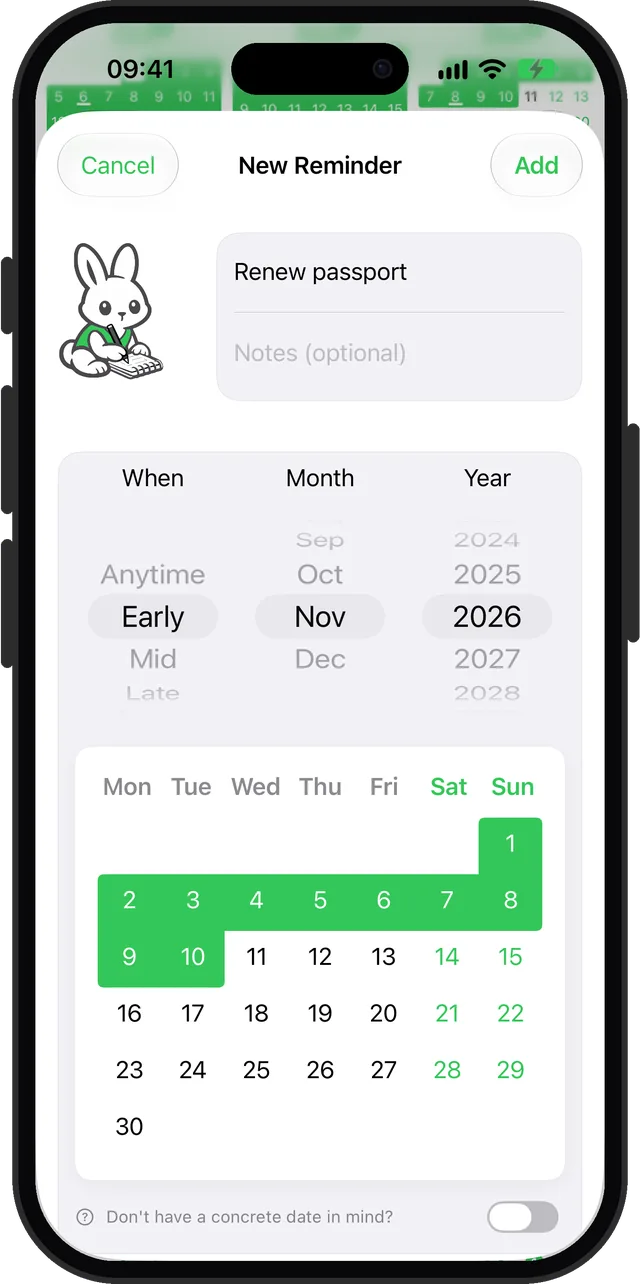
How to set one
- Tap the + button and type the reminder.
- In When, pick Early, Mid, Late or Anytime.
- Pick the month and year, and save.
The reminder now shows in your list as, say, Early November 2026, and appears in the Month and Yearly views across that stretch of days.
Will it notify me?
Approximate reminders do not fire a notification at a set time, because there is no set time. They show up in your lists, calendars and widgets for their whole window. If you want a push, turn on the weekly or monthly summary in Settings > Notifications, or switch the reminder to an exact date once the day becomes clear.
Questions
Can I set a reminder for early next month instead of a specific day?
Not in apps that require a due date. In Remi, choose Early, Mid, Late or Anytime and a month. Early covers the 1st to the 10th by default, Mid the 11th to the 20th, and Late the 21st to the end of the month.
Can I change what counts as early, mid and late?
Yes. Remi has a few presets in Settings, for example 1-10 / 11-20 / 21-end, or 1-7 / 8-21 / 22-end.
Updated 2026-10-01. Written by Emils Ozols, who makes Remi.