Recurring reminders: monthly, quarterly, yearly or every N
Remi repeats a reminder every month, every 2 months, every year, or every N months, quarters or years. Repeats are part of Premium, a one-time purchase.
 Remi is an iPhone appPoint your iPhone camera at the code to install it.
or text me the link
Remi is an iPhone appPoint your iPhone camera at the code to install it.
or text me the link
What recurring reminders do
You set a reminder once and choose how often it returns. For month-based reminders (Anytime, Early, Mid or Late of a month) the choices are every month, every 2 months, every year, or a custom interval in months, quarters or years. Exact-date reminders also repeat daily, weekly, every 2 weeks, monthly or every N days, weeks or months.
The Clock app is built for alarms at a time of day, and it does that job well. A bill that comes round every quarter or a filter that needs changing twice a year is a different kind of task: it has no time of day, only a part of the month. A repeat in Remi can land on "Early" or "Late" of the month without inventing an exact day. The flexible scheduling page explains those approximate dates.
How to set one up
- Tap the + button in the middle of the tab bar. The New Reminder screen opens.
- Type the title, for example "Renew passport".
- Pick when it is due. Use the When wheel for Anytime, Early, Mid or Late of a month and year, or choose Exact for a day and time.
- Find the Repeat row below the date and tap its value (it reads Never at first). Choose a frequency from the menu. Pick Custom… to set your own interval.
- For Custom, choose the unit with the segmented control and set the number with the stepper under Custom Interval. It then reads, for example, "Every 3 months".
- Optional: open End repeat and choose Instance to stop after a set number of additional repeats.
- Check the All Repeats card, which lists the coming dates, then tap Add.
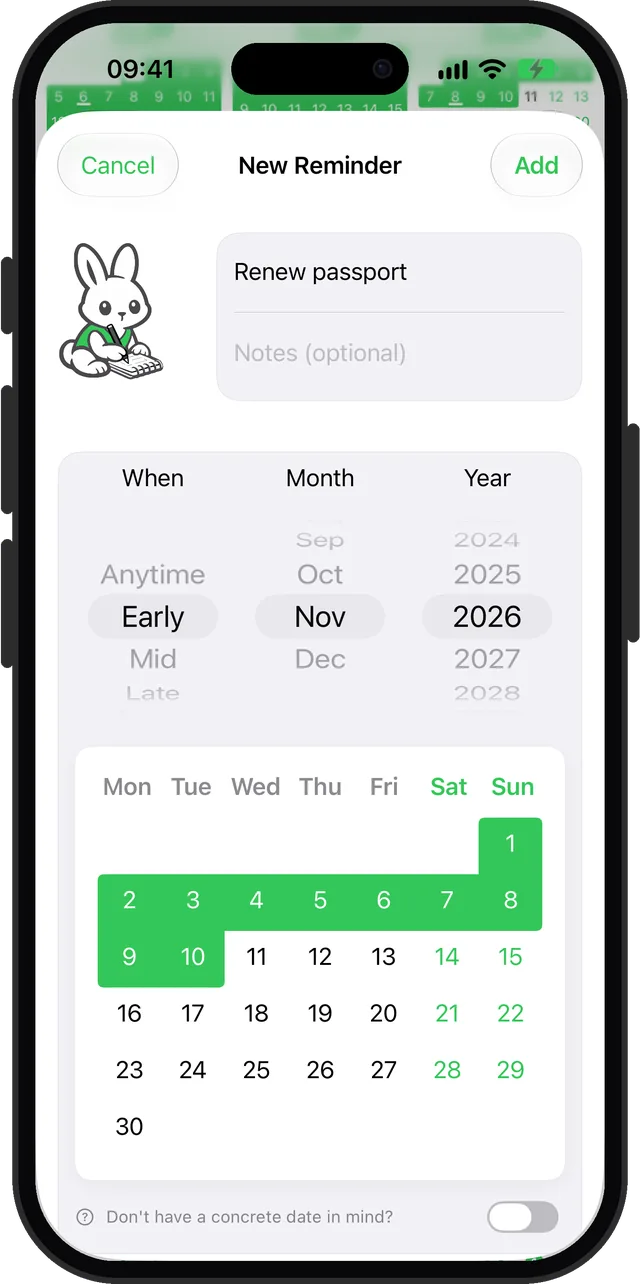
You can also speak it. Phrases such as "quarterly", "every 3 months", "every year" or "yearly" are picked up, as described in voice input.
Every option
| Reminder type | Repeat menu | Custom interval |
|---|---|---|
| Anytime, Early, Mid, Late | Never, Every month, Every 2 months, Every year, Custom… | Month, Quarter or Year, 1 to 24 |
| Exact date and time | Never, Every day, Every week, Every month, Every 2 weeks, Custom… | Day, Week or Month, 1 to 30 |
| Someday | No repeat section | Not available |
End repeat has two choices: Never, or Instance, a stepper from 1 to 999 that reads "After N additional repeats". The count is on top of the first reminder, so "After 3" gives four in total. There is no end-date picker.
In Settings, under General, Repeating reminders show sets how many future repeats appear on the calendars: Next occurrence, Next 10 occurrences or Next 100 occurrences. The default is 10. This only changes what is drawn. The reminder still repeats without limit unless you set an end.
A quarter is three months, so "Every 1 quarter" and "Every 3 months" are the same schedule. For a yearly exact-date reminder, use Custom with 12 months.
When to use it
Rent, bills and subscriptions
Choose Every month on an Early or Late reminder. It comes back each month in the same part of the month. The monthly reminder guide covers the general idea.
Quarterly jobs
Tax estimates, a boiler check, a review of your budget. Use Custom, choose Quarter and leave the number at 1. See the quarterly reminder guide.
Filters and supplies that wear out
Water filters, air filters and smoke alarm batteries have no day on the calendar, only a rough season. A repeat every 6 months on a Mid reminder is enough.
Renewals and birthdays
Passports, car insurance and a friend's birthday come once a year. Choose Every year. Setup steps are in the yearly reminder guide.
A fixed number of repeats
A 12-month course of payments or a six-visit treatment plan ends by itself. Set End repeat to Instance, and the series stops after that count.
Limits
- Repeats need Premium. Without it, the Repeat row shows a crown beside "Never" and opens the Premium screen instead of the menu. Premium is a one-time purchase, not a subscription.
- Someday reminders cannot repeat. The Repeat and End repeat sections are hidden once the someday toggle is on.
- Only exact-date reminders send their own notification. A repeating Early or Mid reminder appears in the lists, Today, the calendars and widgets, and in the optional weekly or monthly summary notification. It does not ring on a day of its own.
- No end date. You can stop after a number of repeats, not on a chosen day.
- Limited day choices. Exact-date reminders offer day, week and month units. A weekday pattern such as "every Monday and Thursday" is not available.
- Date ranges and repeats do not mix. On an exact reminder that spans several days, the menu only offers repeats at least as long as the span, and picking one removes the end date. A range longer than 30 days leaves only Custom.
- Completing one moves on. Ticking a repeating reminder done marks that occurrence and the series carries on. To stop the series, delete it or edit it.
The built-in Reminders app and Calendar also have a repeat choice. Apple's support page notes it when you create a reminder in Calendar. Remi's addition is the month-part repeat: early, mid or late, every N months.
Sources
Questions
How do I set a quarterly reminder on iPhone?
In Remi, choose an Early, Mid or Late date, open Repeat and tap Custom…, then select Quarter and leave the number at 1. The reminder returns every three months. Repeats need Premium.
Can I set an every 3 months reminder on iPhone?
Yes. On an approximate reminder in Remi, use Custom with Month set to 3, or Quarter set to 1. On an exact-date reminder, Custom offers Month with a stepper from 1 to 30.
How do I make a yearly reminder on iPhone?
Create the reminder in Remi and set Repeat to Every year. For an exact-date reminder, use Custom with 12 months. The Yearly tab then shows it again in the right month.
Can a recurring reminder stop after a set number of times?
Yes. Under End repeat, choose Instance and set the number of additional repeats, from 1 to 999. The total is that number plus the first reminder. There is no option to stop on a chosen date.
Are recurring reminders free in Remi?
No. Creating a repeat needs Premium, a one-time purchase. Free users see a crown on the Repeat row. One-off reminders up to five years ahead stay free.
Set it once, see it come back
Get Remi on the App StoreMore features
Sync your reminders to the iPhone Calendar app
Copy your reminders into an iPhone calendar as all-day events, one way, so your calendar shows them without ever changing Remi.
iCloud Backup and Restore in Remi
Back up your reminders and settings to your own iCloud and restore them from inside the app.
Reminder widgets for your iPhone Home Screen
Eight Home Screen widgets show today's list, calendars, upcoming reminders and overdue counts, two of them free.
Updated 2026-11-01. Written by Emils Ozols, who makes Remi.