How to See Your Whole Year of Reminders at a Glance
Most reminder apps show you today and maybe this week. The expensive surprises, the insurance renewal, the passport, the annual service, live further out than that.
Why a year view matters
Lists are good at "what is next" and bad at "what is coming". A year laid out as twelve small calendars shows you shape: which months are crowded, which are quiet, where the renewals cluster. That is when you can do something about it, like moving the garage clear-out to a quiet month.
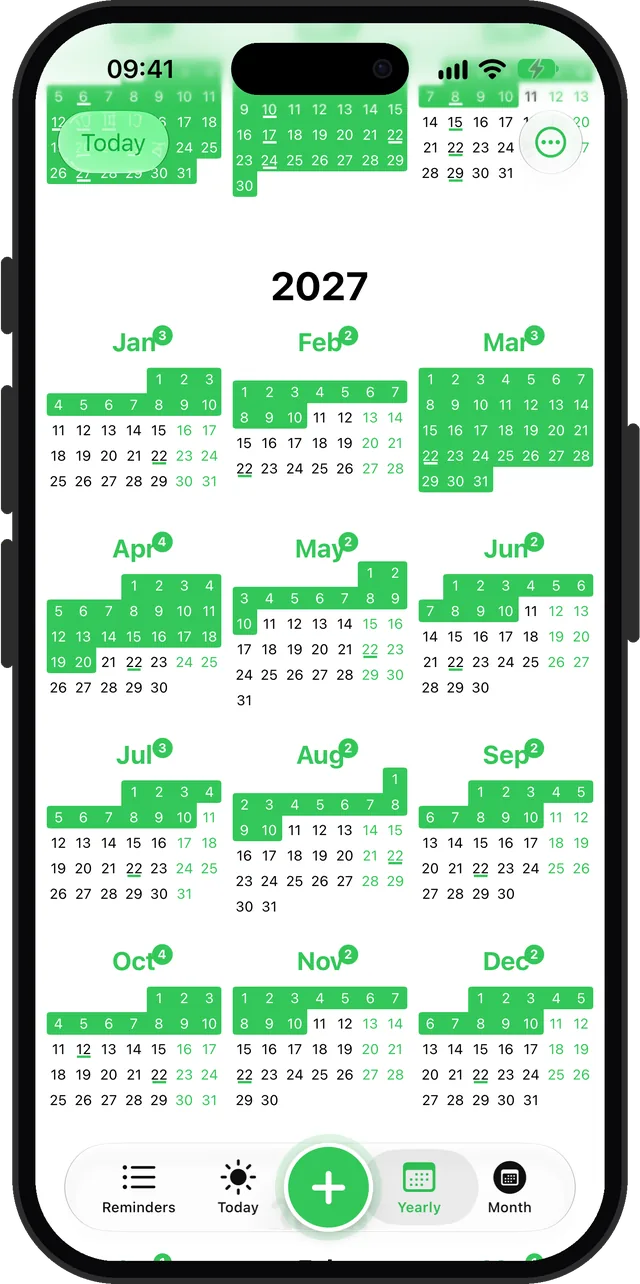
The Yearly view in Remi
- All twelve months on one screen, scrolling on into next year.
- Each month shows a count of its reminders.
- Days with exact-date reminders are underlined; approximate reminders (Early, Mid, Late, Anytime) shade their stretch of the month.
- Tap a month to open it in the Month view.
Filling it in once
Spend ten minutes adding the recurring things that come round every year: insurance and subscription renewals, the car and boiler services, birthdays, tax deadlines. Set them to repeat yearly and you will not need to do this again. See yearly reminders for how.
Further than a year
The free version covers the next twelve months. Premium lets you plan beyond that.
Questions
Can I see all my reminders for the year on iPhone?
Yes, in Remi. The Yearly tab shows all twelve months at once, with reminder days marked and a count on each month.
Updated 2026-10-01. Written by Emils Ozols, who makes Remi.